<?xml version="1.0" encoding="utf-8"?><feed xmlns="http://www.w3.org/2005/Atom" ><generator uri="https://jekyllrb.com/" version="3.10.0">Jekyll</generator><link href="https://tgharold.github.io/blog/atom.xml" rel="self" type="application/atom+xml" /><link href="https://tgharold.github.io/blog/" rel="alternate" type="text/html" /><updated>2026-04-14T10:20:03+00:00</updated><id>https://tgharold.github.io/blog/atom.xml</id><title type="html">Tech Blog</title><subtitle>Technical stuff.</subtitle><entry><title type="html">Getting VSCode, Claude Code and a local LLM to play nicely</title><link href="https://tgharold.github.io/blog/2026-04-12-getting-vscode-claude-code-and-local-llm-to-play-nicely/" rel="alternate" type="text/html" title="Getting VSCode, Claude Code and a local LLM to play nicely" /><published>2026-04-12T19:38:00+00:00</published><updated>2026-04-12T19:38:00+00:00</updated><id>https://tgharold.github.io/blog/getting-vscode-claude-code-and-local-llm-to-play-nicely</id><content type="html" xml:base="https://tgharold.github.io/blog/2026-04-12-getting-vscode-claude-code-and-local-llm-to-play-nicely/"><![CDATA[<p>(Qwen wrote this, I trimmed it back)</p>

<p>As part of my ongoing experimentation with local LLMs and AI-assisted development, I’ve been working on setting up a seamless development environment for my Jekyll-based blog that allows me to leverage Claude Code inside a devcontainer while communicating with a local LLM running on my host machine.</p>

<h2 id="the-challenge">The Challenge</h2>

<p>My main goal was to create a development environment that combines:</p>

<ol>
  <li>A Jekyll-based blog in a Docker devcontainer for consistent builds</li>
  <li>VSCode’s Claude Code extension for AI assistance</li>
  <li>Communication with a local LLM running on my host machine</li>
</ol>

<p>This combination would let me write and edit blog posts while having Claude Code leverage my local LLM for responses, providing a more privacy-focused development experience without sacrificing functionality.</p>

<p>This also paves the way for me to switch to <a href="https://opencode.ai/">OpenCode</a>.  That has fewer guardrails than Claude Code making it more important to run inside an isolated environment.</p>

<h2 id="the-setup-process">The Setup Process</h2>

<p>I’m going to use the <code class="language-plaintext highlighter-rouge">mcr.microsoft.com/devcontainers/jekyll:bookworm</code> image as the foundation for the devcontainer.  On top of that I’m going to add:</p>

<ul>
  <li>Node.js for JavaScript tooling</li>
  <li>Python for various scripts and utilities</li>
  <li>Claude Code feature for AI assistance</li>
</ul>

<p>In addition, it’s recommended that the following mounts are in place:</p>

<ul>
  <li>Mounting of local Claude configuration files</li>
</ul>

<p>Some environment variables are being passed in from the host, some are being overriden.</p>

<h2 id="the-current-working-state">The Current Working State</h2>

<p>While some aspects of the integration are still a bit in flux (as I noted in the commit messages), the core functionality is working:</p>

<ul>
  <li>VSCode Claude Code extension is properly set up in the devcontainer</li>
  <li>The <code class="language-plaintext highlighter-rouge">ANTHROPIC_BASE_URL</code> is correctly configured to point to <code class="language-plaintext highlighter-rouge">http://host.docker.internal:1234</code></li>
  <li>The <code class="language-plaintext highlighter-rouge">ANTHROPIC_AUTH_TOKEN</code> is available through environment variables</li>
  <li>Local LLM communication is functional</li>
</ul>

<h2 id="looking-forward">Looking Forward</h2>

<p>This is just a starting point.  But I have a branch to consider:</p>

<p>If I continue to use Claude Code with a local LLM, I need to come up with a solution for the broken WebSearch tooling.  Claude Code uses server-side tools on Anthropic’s servers which the local LLM does not support.  That probably means running an MCP search proxy in Docker Desktop on the host and wiring up Claude to use it.  Getting that working today has escaped my abilities.</p>

<p>The other fork is to switch to OpenCode which doesn’t make the assumptions that Claude Code does about some tools at the <code class="language-plaintext highlighter-rouge">ANTHROPIC_BASE_URL</code> LLM.  Now that I have devcontainers working, it’s worth considering the switch.</p>

<h2 id="devcontainerjson">devcontainer.json</h2>

<p>I could probably drop the ‘node’ feature without issue.  It’s in there because I was trying to get the MCP server working.</p>

<pre><code class="language-JSON">{
	"name": "Jekyll",
	"image": "mcr.microsoft.com/devcontainers/jekyll:bookworm",
	"features": {
		"ghcr.io/devcontainers/features/node:1": {},
		"ghcr.io/devcontainers/features/python:1": {},
		"ghcr.io/anthropics/devcontainer-features/claude-code:1.0": {}
	},
	"mounts": [
		"source=${localEnv:HOME}/.claude,target=/home/vscode/.claude,type=bind"
	],
	"remoteEnv": {
		"ANTHROPIC_AUTH_TOKEN": "${localEnv:ANTHROPIC_AUTH_TOKEN}",
		"ANTHROPIC_BASE_URL": "http://host.docker.internal:1234",
		"ANTHROPIC_MODEL": "${localEnv:ANTHROPIC_MODEL}"
	},
	"customizations": {
		"vscode": {
			"extensions": [
				"Anthropic.claude-code"
			]
		}
	}
}
</code></pre>]]></content><author><name>Thomas Harold</name><email>tgh@tgharold.com</email></author><category term="[&quot;Tech&quot;]" /><category term="LLM" /><category term="ClaudeCode" /><category term="DevContainers" /><category term="VSCode" /><summary type="html"><![CDATA[(Qwen wrote this, I trimmed it back)]]></summary></entry><entry><title type="html">macOS 26, VS Code Dev Containers and SSL errors on feature loading</title><link href="https://tgharold.github.io/blog/2026-04-12-macos-26-vs-code-dev-containers-and-ssl-errors-on-feature-loading/" rel="alternate" type="text/html" title="macOS 26, VS Code Dev Containers and SSL errors on feature loading" /><published>2026-04-12T19:38:00+00:00</published><updated>2026-04-12T19:38:00+00:00</updated><id>https://tgharold.github.io/blog/macos-26-vs-code-dev-containers-and-ssl-errors-on-feature-loading</id><content type="html" xml:base="https://tgharold.github.io/blog/2026-04-12-macos-26-vs-code-dev-containers-and-ssl-errors-on-feature-loading/"><![CDATA[<p>Here’s something that might bite you when trying to get Dev Containers working inside of VS Code on macOS 26.  Loading the image will probably work fine, but as soon as you try to add additional features to the devcontainer.json you will start getting SSL errors.</p>

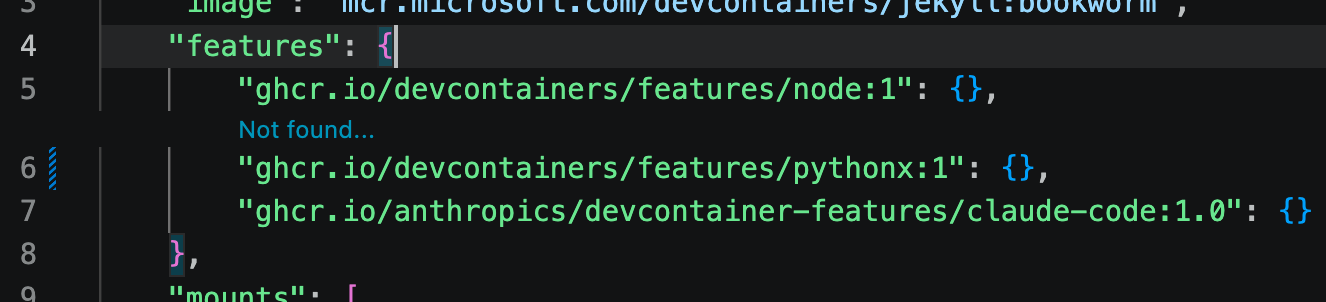
<p>One symptom that you will see is that VS Code will display “Not found…” above the line where you are trying to add the new features entry.  Here I am demonstrating this error by putting the wrong label for <code class="language-plaintext highlighter-rouge">ghcr.io/devcontainers/features/python</code>:</p>

<p><img src="https://tgharold.github.io/blog/images/2026/04/2026-04-12-features-not-found-error.png" alt="&quot;Not found...&quot; error on a bad features entry" /></p>

<p>Another symptom will be seen if you forge ahead and try to rebuild the devcontainer after modifying the JSON file.  In this example, I’m trying to install <code class="language-plaintext highlighter-rouge">ghcr.io/anthropics/devcontainer-features/claude-code</code>.</p>

<div class="language-plaintext highlighter-rouge"><div class="highlight"><pre class="highlight"><code>* Processing feature: ghcr.io/anthropics/devcontainer-features/claude-code:1.0
Loading 29 extra certificates from
    /var/folders/cp/1wcp5mg929nbh0gl917cz6bh0000gn/T/vsch/certificates-fe520313cc9ed9b2d230be837320eccab23a7a9a21806af62f2558dd410386cc.pem.
Error: unable to get issuer certificate
    at TLSSocket.onConnectSecure (node:_tls_wrap:1697:34)
    at TLSSocket.emit (node:events:519:28)
    at TLSSocket._finishInit (node:_tls_wrap:1095:8)
    at ssl.onhandshakedone (node:_tls_wrap:881:12)
Stop (309 ms): Run: /Applications/Visual Studio Code.app/Contents/Frameworks/Code Helper (Plugin).app/Contents/MacOS/Code Helper (Plugin)
    ~/.vscode/extensions/ms-vscode-remote.remote-containers-0.447.0/dist/spec-node/devContainersSpecCLI.js up
    --user-data-folder ~/Library/Application Support/Code/User/globalStorage/ms-vscode-remote.remote-containers/data
    --container-session-data-folder /tmp/devcontainers-76e7e5e8-33e1-42a4-af53-9812e7575de61776005876783
    --workspace-folder ~/blog
    --workspace-mount-consistency cached
    --gpu-availability detect
    --id-label devcontainer.local_folder=~/blog
    --id-label devcontainer.config_file=~/blog/.devcontainer/devcontainer.json
    --log-level debug
    --log-format json
    --config ~/blog/.devcontainer/devcontainer.json
    --default-user-env-probe loginInteractiveShell
    --mount type=volume,source=vscode,target=/vscode,external=true
    --skip-post-create
    --update-remote-user-uid-default on
    --mount-workspace-git-root
    --include-configuration
    --include-merged-configuration
Exit code 1
</code></pre></div></div>

<p>Qwen (the local LLM) was asking whether I’m behind a corporate proxy or other software like Zscaler which adds a non-standard SSL certificate to the connection.  It’s a good guess, but I’m not behind such a proxy / intercept.</p>

<p>On another run I got errors like:</p>

<div class="language-plaintext highlighter-rouge"><div class="highlight"><pre class="highlight"><code>[55476 ms] [2026-04-12T14:10:00.830Z] @devcontainers/cli 0.83.3. Node.js v22.22.1. darwin 25.4.0 arm64.
[55478 ms] [2026-04-12T14:10:00.832Z] Loading 29 extra certificates from /var/folders/cp/1wcp5mg929nbh0gl917cz6bh0000gn/T/vsch/cert
ificates-fe520313cc9ed9b2d230be837320eccab23a7a9a21806af62f2558dd410386cc.pem.
[55589 ms] Error: unable to get issuer certificate
[55590 ms]     at TLSSocket.onConnectSecure (node:_tls_wrap:1697:34)
[55590 ms]     at TLSSocket.emit (node:events:519:28)
[55590 ms]     at TLSSocket._finishInit (node:_tls_wrap:1095:8)
[55590 ms]     at ssl.onhandshakedone (node:_tls_wrap:881:12) {
[55590 ms]   code: 'UNABLE_TO_GET_ISSUER_CERT'
</code></pre></div></div>

<p>If you run tests, both in the host and inside the devcontainer, with <code class="language-plaintext highlighter-rouge">openssl</code> and <code class="language-plaintext highlighter-rouge">curl</code> then nothing wrong will be seen.  That’s a strong clue.  If <code class="language-plaintext highlighter-rouge">openssl</code> and <code class="language-plaintext highlighter-rouge">curl</code> tests indicate success then you need to look at what is actually doing the install of those features.</p>

<p>Qwen was unable to help me, mostly because it can’t search the web when running behind Claude Code (HTTP 422 errors).  I had to do my own web searches to find the solution.</p>

<p>The secret is that on macOS, NPM is struggling.  One or both of the following lines had to be added to my <code class="language-plaintext highlighter-rouge">~/.zshrc</code> file:</p>

<div class="language-plaintext highlighter-rouge"><div class="highlight"><pre class="highlight"><code>export NODE_EXTRA_CA_CERTS=/etc/ssl/cert.pem
export SSL_CERT_FILE=/etc/ssl/cert.pem
</code></pre></div></div>

<p>The SSL errors went away once I added those and restarted Visual Studio Code.</p>]]></content><author><name>Thomas Harold</name><email>tgh@tgharold.com</email></author><category term="[&quot;Tech&quot;]" /><category term="DevContainers" /><category term="VSCode" /><category term="macOS" /><summary type="html"><![CDATA[Here’s something that might bite you when trying to get Dev Containers working inside of VS Code on macOS 26. Loading the image will probably work fine, but as soon as you try to add additional features to the devcontainer.json you will start getting SSL errors.]]></summary></entry><entry><title type="html">Converting old Blogger or old hosting URLs to the new style using Qwen3-Coder</title><link href="https://tgharold.github.io/blog/2026-04-11-converting-old-blogger-and-hosting-urls-with-qwen3-coder/" rel="alternate" type="text/html" title="Converting old Blogger or old hosting URLs to the new style using Qwen3-Coder" /><published>2026-04-11T21:48:00+00:00</published><updated>2026-04-11T21:48:00+00:00</updated><id>https://tgharold.github.io/blog/converting-old-blogger-and-hosting-urls-with-qwen3-coder</id><content type="html" xml:base="https://tgharold.github.io/blog/2026-04-11-converting-old-blogger-and-hosting-urls-with-qwen3-coder/"><![CDATA[<p>Recently, I’ve been experimenting with using local LLMs through Claude Code to avoid consuming my Claude.ai subscription tokens. This involved setting up Qwen3-Coder-30B-A3B-Instruct-MLX-6bit on my MacBook Pro with an M3 Max chip and 64GB of RAM using <a href="https://omlx.ai/">omlx</a>.</p>

<p>Technical specifications:</p>
<ul>
  <li>MacBook Pro with M3 Max chip and 64GB RAM</li>
  <li>Running omlx locally</li>
  <li>Using Qwen3-Coder-30B-A3B-Instruct-MLX-6bit LLM model</li>
  <li>Max context window: 200,000 tokens</li>
  <li>Max tokens: 100,000 tokens</li>
</ul>

<p>Performance-wise, the model generates around 22-25 tokens per second, with a prefill of 214-250 for non-cached prefill. The cache efficiency is running at 97% for prefill tokens, which provides decent savings and speed.  That’s the numbers reported after processing about 78 million prefill tokens per the dashboard.</p>

<p>While the model performs adequately, it’s not quite as capable as Sonnet within Claude Code. I need to break down problems into smaller steps and be very explicit to get the desired results. It also tends to forget to reference CLAUDE.md and its memory files regarding my preferences. This is evident in many commits to my blog repository that are missing the co-author line, despite my explicit instructions in the CLAUDE.md file (https://github.com/tgharold/blog/blob/master/CLAUDE.md).</p>

<p>As part of this experimentation, I created the <a href="https://github.com/tgharold/blog/blob/master/convert_blogger_to_jekyll_url_mappings.py">convert_blogger_to_jekyll_url_mappings.py</a> script using the Qwen3-Coder model. However, looking at the <a href="https://github.com/tgharold/blog/commits/master/convert_blogger_to_jekyll_url_mappings.py">various commits to that file</a>, I had to guide it through the process step-by-step. While it would have been faster for me to write the script myself, I was still learning Python and needed the model to demonstrate the implementation approach.</p>]]></content><author><name>Thomas Harold</name><email>tgh@tgharold.com</email></author><category term="[&quot;Tech&quot;]" /><category term="LLM" /><category term="Qwen3" /><summary type="html"><![CDATA[Recently, I’ve been experimenting with using local LLMs through Claude Code to avoid consuming my Claude.ai subscription tokens. This involved setting up Qwen3-Coder-30B-A3B-Instruct-MLX-6bit on my MacBook Pro with an M3 Max chip and 64GB of RAM using omlx.]]></summary></entry><entry><title type="html">FSVS on Ubuntu Server 18.04.1</title><link href="https://tgharold.github.io/blog/2018-11-16-fsvs-ubuntu-server-1810/" rel="alternate" type="text/html" title="FSVS on Ubuntu Server 18.04.1" /><published>2018-11-16T21:34:00+00:00</published><updated>2018-11-16T21:34:00+00:00</updated><id>https://tgharold.github.io/blog/fsvs-ubuntu-server-1810</id><content type="html" xml:base="https://tgharold.github.io/blog/2018-11-16-fsvs-ubuntu-server-1810/"><![CDATA[<p>Under CentOS Server, there were some extra things that had to be installed at the start to use <a href="http://fsvs.tigris.org/">FSVS</a>.  This is the first time that I’m installing under Ubuntu Server.</p>

<p>FSVS is a way of version controlling your entire server (or parts of it, like <code class="language-plaintext highlighter-rouge">/etc</code>) into Subversion (SVN).  For servers that you are not managing with puppet / chef / ansible / etc., it provides a way to track configuration changes over time.  Even with configuration systems like puppet/chef, it can still be useful for tracking configuration changes over time.  Since SVN is a very efficient over-the-wire protocol for binary files, it can also be used to backup those in addition to text-based configuration files.  It gets more efficient when multiple servers are all stored in the same SVN repository as you’ll get deduplication across the entire repo.</p>

<hr />

<p>I’m starting with a brand new install of Ubuntu Server 18.04.1 using the <code class="language-plaintext highlighter-rouge">ubuntu-18.04.1-live-server-amd64.iso</code> file.  This is being installed on a Synology NAS (plus series) with 1GB RAM and 1TB of drive space allocated for the VM.</p>

<div class="language-plaintext highlighter-rouge"><div class="highlight"><pre class="highlight"><code>sudo add-apt-repository universe
sudo apt update
</code></pre></div></div>

<p>The default install only includes bionic, bionic-security and bionic-dates PPAs.  To get some other packages, you’ll need to install the “universe” PPA.  Once you have the universe installed, the following should work.</p>

<div class="language-plaintext highlighter-rouge"><div class="highlight"><pre class="highlight"><code>sudo apt install fsvs
</code></pre></div></div>

<p>That package will also require some other things to be installed like subversion and a few other things.</p>

<p>(This is so much easier than what I had to jump through on CentOS 5 and 6.  My thanks go out to the person that added the fsvs package to the Ubuntu package repository.)</p>]]></content><author><name>Thomas Harold</name><email>tgh@tgharold.com</email></author><category term="[&quot;SysAdmin&quot;]" /><category term="FSVS" /><category term="Linux" /><summary type="html"><![CDATA[Under CentOS Server, there were some extra things that had to be installed at the start to use FSVS. This is the first time that I’m installing under Ubuntu Server.]]></summary></entry><entry><title type="html">Setting up Skinny Bones for GitHub Pages</title><link href="https://tgharold.github.io/blog/2018-06-27-setting-up-skinny-bones/" rel="alternate" type="text/html" title="Setting up Skinny Bones for GitHub Pages" /><published>2018-06-27T12:39:00+00:00</published><updated>2018-06-27T12:39:00+00:00</updated><id>https://tgharold.github.io/blog/setting-up-skinny-bones</id><content type="html" xml:base="https://tgharold.github.io/blog/2018-06-27-setting-up-skinny-bones/"><![CDATA[<p>Test Update</p>]]></content><author><name>Thomas Harold</name><email>tgh@tgharold.com</email></author><category term="[&quot;Website&quot;]" /><category term="Jekyll" /><category term="Skinny Bones" /><summary type="html"><![CDATA[Test Update]]></summary></entry><entry><title type="html">SNMP and MRTG: Interesting OIDs in net-snmp</title><link href="https://tgharold.github.io/blog/2009-12-06-snmp-and-mrtg-interesting-oids-in-net-snmp/" rel="alternate" type="text/html" title="SNMP and MRTG: Interesting OIDs in net-snmp" /><published>2009-12-06T23:26:00+00:00</published><updated>2009-12-06T23:26:00+00:00</updated><id>https://tgharold.github.io/blog/snmp-and-mrtg-interesting-oids-in-net-snmp</id><content type="html" xml:base="https://tgharold.github.io/blog/2009-12-06-snmp-and-mrtg-interesting-oids-in-net-snmp/"><![CDATA[<p>These can all be found via the “snmpwalk” command in CentOS 5.4 (or RHEL 5.4).</p>

<div class="language-plaintext highlighter-rouge"><div class="highlight"><pre class="highlight"><code># snmp -v 1 -c public localhost | less
</code></pre></div></div>

<p>The above assumes that you have configured the SNMP agent on the server to allow read-only access to SNMP v1 clients via the “public” community string.</p>

<p><b>Approximate number of users logged in</b></p>

<div class="language-plaintext highlighter-rouge"><div class="highlight"><pre class="highlight"><code>HOST-RESOURCES-MIB::hrSystemNumUsers.0 = Gauge32: 3
</code></pre></div></div>

<p>Number of logged in users.  As you can see, this is a gauge value which means (in SNMP terms) that it is a value that can increase or decrease over time.  By default, MRTG assumes that the value is monotonically increasing.</p>

<p>Note: Since MRTG only samples once every 5 minutes, this value is very approximate.</p>

<p><b>Approximate number of system processes</b></p>

<div class="language-plaintext highlighter-rouge"><div class="highlight"><pre class="highlight"><code>HOST-RESOURCES-MIB::hrSystemProcesses.0 = Gauge32: 171
</code></pre></div></div>

<p>Current number of processes running.  This often makes a good second number to pair up with the number of users.  Or you could choose to display them on separate graphs.</p>

<p>Note: Same issue as logging the number of users, MRTG only samples every 5 minutes which makes this an estimation at best.</p>

<p><b>MRTG: Reporting on processes and users</b></p>

<p>Here’s a fragment from my MRTG configuration file that shows how I reported on the number of users and processes.  I could not get MRTG to resolve the plain names to OIDs automatically, so I had to put in the full numeric OIDs.</p>

<div class="language-plaintext highlighter-rouge"><div class="highlight"><pre class="highlight"><code>### PROCESSES &amp; USERS
Options[_]: gauge, integer, noborder, noinfo, nolegend, noo, nopercent, pngdate, printrouter, transparent
WithPeak[_]: ymw
Legend2[_]:
Legend3[_]:
Legend4[_]:

#Target[localhost.system.users]: hrSystemNumUsers.0&amp;hrSystemNumUsers.0:public@localhost
Target[localhost.system.users]: .1.3.6.1.2.1.25.1.5.0&amp;.1.3.6.1.2.1.25.1.5.0:public@localhost
MaxBytes[localhost.system.users]: 50
YLegend[localhost.system.users]: Users
LegendI[localhost.system.users]: Users
Legend1[localhost.system.users]: Approximate number of users logged in
ShortLegend[localhost.system.users]: ~
Title[localhost.system.users]: firewall:Users - Approximate System Users
PageTop[localhost.system.users]: &lt;h1&gt;firewall: Approximate System Users&lt;/h1&gt;
&amp;#160;&amp;#160;&amp;#160;&amp;#160;&lt;div id="sysdetails"&gt;
&amp;#160;&amp;#160;&amp;#160;&amp;#160;&lt;/div&gt;

#Target[localhost.system.processes]: hrSystemProcesses.0&amp;hrSystemProcesses.0:public@localhost
Target[localhost.system.processes]: .1.3.6.1.2.1.25.1.6.0&amp;.1.3.6.1.2.1.25.1.6.0:public@localhost
MaxBytes[localhost.system.processes]: 5000
YLegend[localhost.system.processes]: Processes
LegendI[localhost.system.processes]: Processes
Legend1[localhost.system.processes]: Approximate number of processes
ShortLegend[localhost.system.processes]: ~
Title[localhost.system.processes]: firewall:Procs - Approximate System Processes
PageTop[localhost.system.processes]: &lt;h1&gt;firewall: Approximate System Processes&lt;/h1&gt;
&amp;#160;&amp;#160;&amp;#160;&amp;#160;&lt;div id="sysdetails"&gt;
&amp;#160;&amp;#160;&amp;#160;&amp;#160;&lt;/div&gt;
</code></pre></div></div>

<p><b>Real Memory in Use</b></p>

<div class="language-plaintext highlighter-rouge"><div class="highlight"><pre class="highlight"><code>HOST-RESOURCES-MIB::hrStorageType.2 = OID: HOST-RESOURCES-TYPES::hrStorageRam
HOST-RESOURCES-MIB::hrStorageDescr.2 = STRING: Real Memory
HOST-RESOURCES-MIB::hrStorageAllocationUnits.2 = INTEGER: 1024 Bytes
HOST-RESOURCES-MIB::hrStorageSize.2 = INTEGER: 8043628
HOST-RESOURCES-MIB::hrStorageUsed.2 = INTEGER: 7962536
</code></pre></div></div>

<p><b>Swap (Virtual) Memory in Use</b></p>

<div class="language-plaintext highlighter-rouge"><div class="highlight"><pre class="highlight"><code>HOST-RESOURCES-MIB::hrStorageType.3 = OID: HOST-RESOURCES-TYPES::hrStorageVirtualMemory
HOST-RESOURCES-MIB::hrStorageDescr.3 = STRING: Swap Space
HOST-RESOURCES-MIB::hrStorageAllocationUnits.3 = INTEGER: 1024 Bytes
HOST-RESOURCES-MIB::hrStorageSize.3 = INTEGER: 4021814
HOST-RESOURCES-MIB::hrStorageUsed.3 = INTEGER: 8292
</code></pre></div></div>

<p><b>Processor Utilization</b></p>

<p>First, we need to find the OIDs of the CPUs.</p>

<div class="language-plaintext highlighter-rouge"><div class="highlight"><pre class="highlight"><code># snmpwalk -v 1 -c public localhost | grep "HOST-RESOURCES" | egrep "hrDeviceProcessor"
HOST-RESOURCES-MIB::hrDeviceType.768 = OID: HOST-RESOURCES-TYPES::hrDeviceProcessor
HOST-RESOURCES-MIB::hrDeviceType.769 = OID: HOST-RESOURCES-TYPES::hrDeviceProcessor
HOST-RESOURCES-MIB::hrSWRunParameters.32755 = STRING: "hrDeviceProcessor"
</code></pre></div></div>

<p>That gives us 768 and 769 to look at.</p>

<div class="language-plaintext highlighter-rouge"><div class="highlight"><pre class="highlight"><code># snmpwalk -v 1 -c public localhost | grep "HOST-RESOURCES" | egrep "(768|769)"        
HOST-RESOURCES-MIB::hrDeviceIndex.768 = INTEGER: 768
HOST-RESOURCES-MIB::hrDeviceIndex.769 = INTEGER: 769
HOST-RESOURCES-MIB::hrDeviceType.768 = OID: HOST-RESOURCES-TYPES::hrDeviceProcessor
HOST-RESOURCES-MIB::hrDeviceType.769 = OID: HOST-RESOURCES-TYPES::hrDeviceProcessor
HOST-RESOURCES-MIB::hrDeviceDescr.768 = STRING: AuthenticAMD: AMD Athlon(tm) 64 X2 Dual Core Processor 4200+
HOST-RESOURCES-MIB::hrDeviceDescr.769 = STRING: AuthenticAMD: AMD Athlon(tm) 64 X2 Dual Core Processor 4200+
HOST-RESOURCES-MIB::hrDeviceID.768 = OID: SNMPv2-SMI::zeroDotZero
HOST-RESOURCES-MIB::hrDeviceID.769 = OID: SNMPv2-SMI::zeroDotZero
HOST-RESOURCES-MIB::hrProcessorFrwID.768 = OID: SNMPv2-SMI::zeroDotZero
HOST-RESOURCES-MIB::hrProcessorFrwID.769 = OID: SNMPv2-SMI::zeroDotZero
HOST-RESOURCES-MIB::hrProcessorLoad.768 = INTEGER: 1
HOST-RESOURCES-MIB::hrProcessorLoad.769 = INTEGER: 1
</code></pre></div></div>

<p>So by looking at the hrProcessorLoad for nodes 768 &amp; 769, we can track the CPU utilization on this PC.  But unless you can get MRTG to load the MIBs, you’ll need to use the numeric OID format.</p>

<div class="language-plaintext highlighter-rouge"><div class="highlight"><pre class="highlight"><code># snmpwalk -v 1 -c public localhost -On | egrep "(768|769)" | grep "INTEGER"
.1.3.6.1.2.1.25.3.3.1.2.768 = INTEGER: 9
.1.3.6.1.2.1.25.3.3.1.2.769 = INTEGER: 17
</code></pre></div></div>]]></content><author><name>Thomas Harold</name><email>tgh@tgharold.com</email></author><category term="[&quot;Tech&quot;]" /><category term="Technology" /><summary type="html"><![CDATA[These can all be found via the “snmpwalk” command in CentOS 5.4 (or RHEL 5.4).]]></summary></entry><entry><title type="html">FSVS: Install on CentOS 5.4</title><link href="https://tgharold.github.io/blog/2009-11-28-fsvs-install-on-centos-54/" rel="alternate" type="text/html" title="FSVS: Install on CentOS 5.4" /><published>2009-11-28T01:28:00+00:00</published><updated>2009-11-28T01:28:00+00:00</updated><id>https://tgharold.github.io/blog/fsvs-install-on-centos-54</id><content type="html" xml:base="https://tgharold.github.io/blog/2009-11-28-fsvs-install-on-centos-54/"><![CDATA[<p>(Also see my older post on this: <a href="/blog/2008-06-28-fsvs-install-on-centos-5">FSVS - Install on CentOS 5</a>.  Or the original post where I explained the power of <a href="/blog/2007-05-31-fsvs-for-sysadmins">FSVS for sysadmins</a>.)</p>

<p>I’m going to start with the assumption that this is a base CentOS 5.4 install without <em>any</em> package groups selected during the initial install.  In my case, this is a DomU that I’m setting up under Xen to serve as testing server for web development.  The only thing I’ve done so far is setting the root password and configuring it to use a static IP address.</p>

<p>The basic steps will be:</p>
<ol>

<li>Setup the RPMForge repository

</li>
<li>Install the packages needed for FSVS

</li>
<li>Download and compile [FSVS](http://fsvs.tigris.org/)

</li>
<li>Configure ignore patterns

</li>
<li>Do the base check-ins

</li>
</ol>

<p><b>Setting up RPMForge</b></p>

<p>In order to get the latest Subversion packages for your system, you’ll have to <a href="http://rpmrepo.org/RPMforge/Using">add RPMForge as a source repository</a>.  The CentOS base repository only has Subversion 1.4.2 and the latest is currently 1.6.6.  I recommend doing this in conjunction with the yum-priorities package.</p>

<div class="language-plaintext highlighter-rouge"><div class="highlight"><pre class="highlight"><code># yum install yum-priorities
</code></pre></div></div>

<p>After installing the yum-priorities package, you should edit the CentOS-Base.repo file found under /etc/yum.repos.d/.  For the base repositories, I recommend setting them to priority values of 1 through 3.  For example:</p>

<div class="language-plaintext highlighter-rouge"><div class="highlight"><pre class="highlight"><code>[base]
name=CentOS-$releasever - Base
mirrorlist=http://mirrorlist.centos.org/?release=$releasever&amp;arch=$basearch&amp;repo=os
#baseurl=http://mirror.centos.org/centos/$releasever/os/$basearch/
gpgcheck=1
gpgkey=http://mirror.centos.org/centos/RPM-GPG-KEY-CentOS-5
priority=1
exclude=subversion-*
</code></pre></div></div>

<p>I generally give the [base], [updates], [addons], [extras] repositories a priority of “1”, with [centosplus] and [contrib] getting a priority of “3”.</p>

<p>In addition, you’ll need to add or edit the “exclude=” line in the [base] repository section to exclude Subversion from being sourced from that repository.  This will allow the Yum package manager to look in other repositories to find Subversion.</p>

<p>Now we can install the RPMForge repository (see <a href="http://rpmrepo.org/RPMforge/Using">Using RPMForge</a>).</p>

<div class="language-plaintext highlighter-rouge"><div class="highlight"><pre class="highlight"><code># cd /root/
# wget http://packages.sw.be/rpmforge-release/rpmforge-release-0.3.6-1.el5.rf.x86_64.rpm
# rpm -Uhv rpmforge-release-0.3.6-1.el5.rf.x86_64.rpm
# cd /etc/yum.repos.d/
</code></pre></div></div>

<p>Now you should edit the rpmforge.repo file and insert a priority= line.  I recommend a value of 10 or 25.</p>

<p>You can now verify that you’ll pull in the latest Subversion package by the following command:</p>

<div class="language-plaintext highlighter-rouge"><div class="highlight"><pre class="highlight"><code># yum info subversion
Available Packages
Name       : subversion
Arch       : x86_64
Version    : 1.6.6
Release    : 0.1.el5.rf
Size       : 6.8 M
Repo       : rpmforge
</code></pre></div></div>

<p><b>Install the packages needed for FSVS</b></p>

<div class="language-plaintext highlighter-rouge"><div class="highlight"><pre class="highlight"><code># yum install subversion subversion-devel ctags apr apr-devel gcc gdbm gdbm-devel pcre pcre-devel apr-util-devel
</code></pre></div></div>

<p><b>Download and compile FSVS</b></p>

<p>As always, you shouldn’t compile code as the root user.</p>

<div class="language-plaintext highlighter-rouge"><div class="highlight"><pre class="highlight"><code># su username
$ mkdir ~/fsvs
$ cd ~/fsvs
$ wget http://download.fsvs-software.org/fsvs-1.2.1.tar.bz2
$ tar xjf fsvs-1.2.1.tar.bz2
$ cd fsvs-1.2.1
$ ./configure
$ make
$ exit
# cp /home/username/fsvs/fsvs-1.2.1/src/fsvs /usr/local/bin/
# chmod 755 /usr/local/bin/fsvs
</code></pre></div></div>

<p><b>Creating the repository on the SVN server</b></p>

<p>This is how we setup users on our SVN server.  Machine accounts are prefixed as “sys-“ in front of the machine name.  The SVN repository name matches the name of the machine.  In general, only the machine account should have write access to the repository, although you may wish to add other users to the group so that they can gain read-only access.</p>

<div class="language-plaintext highlighter-rouge"><div class="highlight"><pre class="highlight"><code># useradd -m sys-www-test
# passwd sys-www-test
# svnadmin create /var/svn/sys-www-test
# chmod -R 740 sys-www-test
# chmod -R g+s sys-www-test/db
# chown -R sys-www-test:sys-www-test sys-www-test
</code></pre></div></div>

<p>Back on the source machine (our test machine), we’ll need to create an SSH key that can be used on our SVN server.  You may wish to use a slightly larger RSA key (3200 bits or 4096 bits) if you’re working on an extra sensitive server.  But a key size of 2048 bits should be secure for another decade for this purpose.</p>

<div class="language-plaintext highlighter-rouge"><div class="highlight"><pre class="highlight"><code># cd /root/
# mkdir .ssh
# chmod .ssh 700
# cd .ssh
# /usr/bin/ssh-keygen -N '' -C 'svn key for root@hostname' -t rsa -b 2048 -f root@hostname
# cat root@hostname.pub
</code></pre></div></div>

<p>Copy this key into the clipboard or send it to the SVN server or the SVN server administrator.  Then we’ll need to create a ~/.ssh/config file to tell the user what account name, port and key file to use when talking to the SVN server.</p>

<div class="language-plaintext highlighter-rouge"><div class="highlight"><pre class="highlight"><code># vi /root/.ssh/config
Host svn.tgharold.com
Port 22
User sys-www-test
IdentityFile /root/.ssh/root@hostname
</code></pre></div></div>

<p>Back on the SVN server, you’ll need to finish configuration of the user that will add files to the SVN repository.</p>

<div class="language-plaintext highlighter-rouge"><div class="highlight"><pre class="highlight"><code># su username
$ cd ~/
$ mkdir .ssh
$ chmod 700 .ssh
$ cd .ssh
$ cat &gt;&gt; authorized_keys
(paste in the SSH key from the other server)
$ chmod 600 authorized_keys
</code></pre></div></div>

<p>Now you’ll want to prepend the following in front of the key line in the authorized_keys file.</p>

<div class="language-plaintext highlighter-rouge"><div class="highlight"><pre class="highlight"><code>command="/usr/bin/svnserve -t -r /var/svn",no-agent-forwarding,no-pty,no-port-forwarding,no-X11-forwarding
</code></pre></div></div>

<p>That ensures (mostly) that the key can only be used to run the svnserve command and that it can’t be used to access a command shell on the SVN server.</p>

<p>Test the configuration back on the original server by issuing the “svn info” command.  Alternately, you can try to ssh to the SVN repository server.  Errors will usually either be logged in /var/log/secure on the source server or in the same log file on the SVN repository server.</p>

<p>Here’s an example of a successful connection:</p>

<div class="language-plaintext highlighter-rouge"><div class="highlight"><pre class="highlight"><code># ssh svn.tgharold.com
( success ( 2 2 ( ) ( edit-pipeline svndiff1 absent-entries commit-revprops depth log-revprops partial-replay ) ) )
</code></pre></div></div>

<p>This shows that they key is running the “svnserve” command automatically.</p>

<p><b>Connect the system to the SVN repository</b></p>

<p>The very first command that you’ll need to issue for FSVS is the “urls” (or “initialize”) command.  This tells FSVS what repository will be used to store the files.</p>

<div class="language-plaintext highlighter-rouge"><div class="highlight"><pre class="highlight"><code># cd /
# mkdir /var/spool/fsvs
# mkdir /etc/fsvs/
# fsvs urls svn+ssh://svn.tgharold.com/sys-www-test/
</code></pre></div></div>

<p>You may see the following error, which means you need to create the /var/spool/fsvs folder, then reissue the fsvs urls command.</p>

<div class="language-plaintext highlighter-rouge"><div class="highlight"><pre class="highlight"><code>stat() of waa-path "/var/spool/fsvs/" failed. Does your local WAA storage area exist?
</code></pre></div></div>

<p>The following error means that you forgot to create the /etc/fsvs/ folder.</p>

<div class="language-plaintext highlighter-rouge"><div class="highlight"><pre class="highlight"><code>Cannot write to the FSVS_CONF path "/etc/fsvs/".
</code></pre></div></div>

<p><b>Configure ignore patterns and doing the base check-in</b></p>

<p>When constructing ignore patterns, generally work on adding a few directories at a time to the SVN repository.  Everyone has different directories that they won’t want to version, so you’ll need to tailor the following to match your configuration.  However, I generally recommend starting with the following:</p>

<div class="language-plaintext highlighter-rouge"><div class="highlight"><pre class="highlight"><code># cd /
# fsvs ignore group:ignore,./dev
# fsvs ignore group:ignore,./etc/fsvs/
# fsvs ignore group:ignore,./etc/gconf/
# fsvs ignore group:ignore,./etc/gdm/
# fsvs ignore group:ignore,./home/
# fsvs ignore group:ignore,./lost+found
# fsvs ignore group:ignore,./media/
# fsvs ignore group:ignore,./mnt/
# fsvs ignore group:ignore,./proc
# fsvs ignore group:ignore,./root/.gconf
# fsvs ignore group:ignore,./root/.nautilus
# fsvs ignore group:ignore,./selinux/
# fsvs ignore group:ignore,./srv
# fsvs ignore group:ignore,./sys
# fsvs ignore group:ignore,./tmp/
# fsvs ignore group:ignore,./usr/tmp/
# fsvs ignore group:ignore,./var/gdm/
# fsvs ignore group:ignore,./var/lib/mlocate/
# fsvs ignore group:ignore,./var/lock/
# fsvs ignore group:ignore,./var/log/
# fsvs ignore group:ignore,./var/mail/
# fsvs ignore group:ignore,./var/run/
# fsvs ignore group:ignore,./var/spool/
# fsvs ignore group:ignore,./var/tmp/

</code></pre></div></div>

<p>Then you’ll either want to ignore (or encrypt) the SSH key files.</p>

<div class="language-plaintext highlighter-rouge"><div class="highlight"><pre class="highlight"><code># cd /
# fsvs ignore group:ignore,./root/.ssh
# fsvs ignore group:ignore,./etc/ssh/shadow*
# fsvs ignore group:ignore,./etc/ssh/ssh_host_key
# fsvs ignore group:ignore,./etc/ssh/ssh_host_dsa_key
# fsvs ignore group:ignore,./etc/ssh/ssh_host_rsa_key
</code></pre></div></div>

<p>You can check what FSVS is going to version by using the “fsvs status pathname” command (such as “fsvs status /etc”).  Once you are happy with the selection in a particular path, you can do the following command:</p>

<div class="language-plaintext highlighter-rouge"><div class="highlight"><pre class="highlight"><code># fsvs ci -m "base check-in" /etc
</code></pre></div></div>

<p>Repeat this for the various top level trees until you have checked everything in.  Then you should do one last check-in at the root level that catches anything you might have missed.</p>]]></content><author><name>Thomas Harold</name><email>tgh@tgharold.com</email></author><category term="[&quot;Tech&quot;]" /><category term="Technology" /><summary type="html"><![CDATA[(Also see my older post on this: FSVS - Install on CentOS 5. Or the original post where I explained the power of FSVS for sysadmins.)]]></summary></entry><entry><title type="html">FSVS ignore patterns (1.2.0)</title><link href="https://tgharold.github.io/blog/2009-11-21-fsvs-ignore-patterns-120/" rel="alternate" type="text/html" title="FSVS ignore patterns (1.2.0)" /><published>2009-11-21T22:29:00+00:00</published><updated>2009-11-21T22:29:00+00:00</updated><id>https://tgharold.github.io/blog/fsvs-ignore-patterns-120</id><content type="html" xml:base="https://tgharold.github.io/blog/2009-11-21-fsvs-ignore-patterns-120/"><![CDATA[<p>Here’s an example of a more complex FSVS ignore/take pattern.</p>

<p>On our mail server, we store all mail in MailDir folders under the structure of:</p>

<p>/var/vmail/domainname/username/</p>

<p>We keep our user-specific Sieve scripts in a “Home” folder under that location.</p>

<p>/var/vmail/domainname/username/Home/</p>

<p>So obviously, we want to version the Home folder under each user.  But we don’t want to version the other MailDir folders at all.  The trick to this is that because our folder structure is predictable, we can do it in a handful of FSVS ignore patterns.</p>

<div class="language-plaintext highlighter-rouge"><div class="highlight"><pre class="highlight"><code># cd /
# fsvs ignore dump &gt;&gt; /root/fsvs-ignore-yyyymmdd.txt
</code></pre></div></div>

<p>That makes a backup of your current rules, just in case you decide that you don’t like your changes (they can be reloaded with “fsvs ignore load &lt; filename”).</p>

<div class="language-plaintext highlighter-rouge"><div class="highlight"><pre class="highlight"><code># cd /
# fsvs ignore group:ignore,./var/vmail/lost+found
# fsvs ignore group:take,./var/vmail/*
# fsvs ignore group:take,./var/vmail/*/*
# fsvs ignore group:take,./var/vmail/*/*/Home
# fsvs ignore group:take,./var/vmail/*/*/Home/**
# fsvs ignore group:ignore,./var/vmail/**
</code></pre></div></div>

<p>Line 1 “group:ignore,./var/vmail/lost+found”: In our setup /var/vmail is a separate mount point, so we’ll want to ignore the lost+found folder.</p>

<p>Line 2 “group:take,./var/vmail/*”: This tells FSVS to version anything at or below /var/vmail.</p>

<p>Line 3 “ignore group:take,./var/vmail/<em>/</em>”: Grabs the next directory level and files below /var/vmail.</p>

<table>
  <tbody>
    <tr>
      <td>Line 4 “group:take,./var/vmail/<em>/</em>/Home”: Now we grab just the “Home” folder inside of the user’s MailDir directory.  This lets us ignore the new</td>
      <td>cur</td>
      <td>tmp folders as well as the other hidden MailDir folders (such as .Junk).</td>
    </tr>
  </tbody>
</table>

<p>Line 5 “group:take,./var/vmail/<em>/</em>/Home/**”: Grab everything inside of Home and below that point.  This will grab all of the Sieve scripts or other files that are located there.  If you wanted to exclude certain files in Home, you would insert that ignore rule above this line.</p>

<p>Line 6 “group:ignore,./var/vmail/**”: This is the clean-up rule.  Anything not explicitly mentioned above here will now be ignored.  This keeps us from versioning the messages inside the user’s MailDir folders.</p>]]></content><author><name>Thomas Harold</name><email>tgh@tgharold.com</email></author><category term="[&quot;Tech&quot;]" /><category term="Technology" /><summary type="html"><![CDATA[Here’s an example of a more complex FSVS ignore/take pattern.]]></summary></entry><entry><title type="html">Getting started with GPG4Win</title><link href="https://tgharold.github.io/blog/2009-11-20-getting-started-with-gpg4win/" rel="alternate" type="text/html" title="Getting started with GPG4Win" /><published>2009-11-20T23:04:00+00:00</published><updated>2009-11-20T23:04:00+00:00</updated><id>https://tgharold.github.io/blog/getting-started-with-gpg4win</id><content type="html" xml:base="https://tgharold.github.io/blog/2009-11-20-getting-started-with-gpg4win/"><![CDATA[<p><a href="http://www.gpg4win.org/">GNU Privacy Guard for Windows Home Page (GPG4Win)</a> - The GPG4Win project recently released version 2.0.1 of their product, so I figured it was a good time to reexamine GPG4Win.  There have been a few changes since version 1, most notable for me is that WinPT is no longer part of the GPG4Win distribution.</p>

<p><b>Installation</b></p>

<p>For getting started, I strongly recommend using the <a href="http://www.gpg4win.org/download.html">gpg4win-light package</a> at first as you probably won’t need Kleopatra or the german-only manuals).  As for the optional modules, I’d recommend installing GPA and GPGEx at a minimum.  Note that GPGOL is still only compatible with Outlook 2003 and Outlook 2007, so you may wish to not install that module if you use other versions of Microsoft Outlook.  In addition, you probably won’t need Claws Mail at first.</p>

<p>By default, GPG4Win puts your key files under (or wherever your HOMEPATH environment variable points to?):</p>

<p>C:\Documents and Settings\USERNAME\Application Data\gnupg</p>

<p>Make sure you include this location in any backup programs that you are using.  Your public and secret keyrings are stored in this folder and need to be backed up regularly.</p>

<p><b>Public Key Pairs</b></p>

<p>Now we get into the theoretical realm, GPG now supports RSA signing and encryption keys (in addition to the older DSA for signing and Elgamal for encryption methods).  DSA signing keys are limited to 1024 bit lengths, while RSA signing keys can be much longer (512 to 4096 bits are commonly used).  The only restriction that you should keep in mind for RSA keys is that you should never sign with the same key that you use for encryption (and vice-versa).  In GnuPG v2, the default is now to create (2) RSA keys for the account, one for encryption and one for signing.</p>

<p>Typically, you’ll want signing keys to have a very long lifespan (at least 5 years, maybe as long as 20 or more).  This allows you to build a much larger web of trust before your key can no longer be used to sign other keys.  However, you should really expire your encryption key after a few years.  Then, a bit before your encryption key expires, you should add a new encryption subkey to your key with a new expiration date.</p>

<p>Unfortunately, the default creation options in GnuPG will assign the same expiration to both the signing key and the encryption keys.  But this can be fixed using the “gpg –edit-key” command.</p>

<p><b>Creating a GPG key</b></p>

<div class="language-plaintext highlighter-rouge"><div class="highlight"><pre class="highlight"><code>gpg --gen-key
gpg (GnuPG) 2.0.12; Copyright (C) 2009 Free Software Foundation, Inc.
This is free software: you are free to change and redistribute it.
There is NO WARRANTY, to the extent permitted by law.

Please select what kind of key you want:
   (1) RSA and RSA (default)
   (2) DSA and Elgamal
   (3) DSA (sign only)
   (4) RSA (sign only)
Your selection?
</code></pre></div></div>

<p>Unless you have a strong reason to use DSA/Elgamal, you may as well use the defaults in GPG v2 and pick “RSA and RSA”.</p>

<div class="language-plaintext highlighter-rouge"><div class="highlight"><pre class="highlight"><code>RSA keys may be between 1024 and 4096 bits long.
What keysize do you want? (2048)
</code></pre></div></div>

<p>If you’re creating a key that will expire in the next 5 years, I recommend 2048 bits.  For longer durations, you may wish to use 3172 or 4096 bits.</p>

<div class="language-plaintext highlighter-rouge"><div class="highlight"><pre class="highlight"><code>Please specify how long the key should be valid.
         0 = key does not expire
      &lt;n&gt;  = key expires in n days
      &lt;n&gt;w = key expires in n weeks
      &lt;n&gt;m = key expires in n months
      &lt;n&gt;y = key expires in n years
Key is valid for? (0)&lt;/n&gt;&lt;/n&gt;&lt;/n&gt;&lt;/n&gt;
</code></pre></div></div>

<p>For an initial key where you’re not protecting anything super critical, I suggest starting with a 25 year (entered as “25y”) expiration date.  You will be asked to confirm the expiration date (enter “y” to continue).</p>

<div class="language-plaintext highlighter-rouge"><div class="highlight"><pre class="highlight"><code>GnuPG needs to construct a user ID to identify your key.

Real name:
</code></pre></div></div>

<p>For personal use, I suggest just entering your name (i.e. “Thomas Harold”).  But if you’re creating a key for corporate/business use, I suggest adding a bit more information in this field to make things easier for others if they have more then one key with similar names.  I recommend against using parenthesis in this field as it can be confusing later on.  Square brackets “[]”, curly braces “{}”, or angle brackets “&lt;&gt;” are all good choices to set elements off from each other.  Some examples:</p>

<p>Thomas Harold, Acme Inc.
Thomas Harold [Acme]
Thomas Harold <acme inc.="">
Thomas Harold {Example LTD}</acme></p>

<p>Remember, that this and the next two fields are all public information that will be visible to everyone who uses your public key to send you things, or who uses your signing key to verify a signature.</p>

<div class="language-plaintext highlighter-rouge"><div class="highlight"><pre class="highlight"><code>EMail address:
</code></pre></div></div>

<p>This is very simple, you should enter the primary email address that you want associated with this key (i.e. “tgh@tgharold.com”).  If you need to add additional email addresses, you can do that later using the “gpg –edit-key” command.</p>

<div class="language-plaintext highlighter-rouge"><div class="highlight"><pre class="highlight"><code>Comment:
</code></pre></div></div>

<p>The comment field is a <b>public</b> field and will be seen by others.  I recommend putting website information here, or the full company name, or a combination of the two.  Keep in mind that the contents of this field are typically displayed as enclosed in parenthesis, so avoid using parenthesis or brackets/braces here.  Some examples:</p>

<p>www.tgharold.com
Acme Corporation - www.acme.corp
Example LTD, www.example.com</p>

<div class="language-plaintext highlighter-rouge"><div class="highlight"><pre class="highlight"><code>You selected this USER-ID:
    "Thomas Harold [Acme] (Acme Corporate Sales - www.acme.corp) &lt;tgh&gt;"

Change (N)ame, (C)omment, (E)mail or (O)kay/(Q)uit?&lt;/tgh&gt;
</code></pre></div></div>

<p>After entering those three values, you will be presented with how it might look to another user.  As you can see, the comment gets wrapped in parenthesis while the email address gets presented inside of angled brackets.  Once you are satisfied with how it looks, enter “O” for “Okay” to continue.</p>

<p>GnuPG will then pop-up a window that prompts you for a passphrase.  <b>This is extremely important.</b>  The passphrase that protects your key from unauthorized use is the weakest link of the entire GnuPG encryption chain.  Pick something lengthy, yet easy to type, that is extremely difficult for someone to guess or attack.  Write it down if you want, but keep that slip of paper secure in a safe or safety deposit box.</p>

<p>You will eventually be presented with something that looks like:</p>

<div class="language-plaintext highlighter-rouge"><div class="highlight"><pre class="highlight"><code>gpg: checking the trustdb
gpg: 3 marginal(s) needed, 1 complete(s) needed, PGP trust model
gpg: depth: 0  valid:   2  signed:   0  trust: 0-, 0q, 0n, 0m, 0f, 2u
gpg: next trustdb check due at 2009-12-16
pub   3200R/AAFA2876 2009-11-21 [expires: 2009-12-16]
      Key fingerprint = 0324 917E C27D 2FB0 DDEF  ABFA 4DEE 71F0 AAFA 2876
uid                  Thomas Harold [Acme] (Acme Corporate Sales - www.acme.corp) &lt;tgh&gt;
sub   3200R/1972B360 2009-11-21 [expires: 2009-12-16]&lt;/tgh&gt;
</code></pre></div></div>

<p>This means that GnuPG has finished generating your key and has saved it to your keyring.  This sample key (both the encryption key and the signing key) will expire Dec 16, 2009.</p>

<p>The key fingerprint is an important piece of information that should be given to your contacts over a secure channel.  It will allow them to verify that they have the correct key and that they are not subject to a man-in-the-middle (MitM) attack when they use the key.  You can find out the fingerprints of keys in your keyring using the “gpg –fingerprint” command.  Typically, you would send them your public encryption key via email or some other digital method while telling them the key’s fingerprint over an entirely different medium such as a telephone call or a physical piece of paper (letter / package).</p>

<p><b>Editing your key</b></p>

<p>In order to edit your key using GnuPG, you must know the 8-digit key ID.  In the above example it is listed on the line that starts with “pub”.  For example, the key that I just created has a key ID of “AAFA2876”:</p>

<div class="language-plaintext highlighter-rouge"><div class="highlight"><pre class="highlight"><code>pub   3200R/AAFA2876 2009-11-21 [expires: 2009-12-16]
</code></pre></div></div>

<p>In order to edit the key, you will use the following command:</p>

<div class="language-plaintext highlighter-rouge"><div class="highlight"><pre class="highlight"><code>gpg --edit-key aaFa2876
</code></pre></div></div>

<p>As you can see, the key ID is not case sensitive as it is merely an 8-digit hexadecimal string.</p>

<div class="language-plaintext highlighter-rouge"><div class="highlight"><pre class="highlight"><code>gpg (GnuPG) 2.0.12; Copyright (C) 2009 Free Software Foundation, Inc.
This is free software: you are free to change and redistribute it.
There is NO WARRANTY, to the extent permitted by law.

Secret key is available.

pub  3200R/AAFA2876  created: 2009-11-21  expires: 2009-12-16  usage: SC
                     trust: ultimate      validity: ultimate
sub  3200R/1972B360  created: 2009-11-21  expires: 2009-12-16  usage: E
[ultimate] (1). Thomas Harold [Acme] (Acme Corporate Sales - www.acme.corp) &lt;tgh&gt;

Command&gt;&lt;/tgh&gt;
</code></pre></div></div>

<p>This shows us a bunch of information.  The line that starts with “pub” gives us the following information:</p>

<p>pub - indicates that this is the primary key (you will also see “sub”
3200R - this is a 3200 bit RSA key (R=RSA, D=DSA, g=Elgamal)
AAFA2876 - the key ID (or subkey ID)
created: / expire(d|s): - the creation and expiration dates
usage: - indicates how the key can be used (S=sign, E=encrypt)</p>

<p>Useful commands at this point are:</p>

<p>fpr - show key fingerprint
list - list key and user IDs
quit - exit without making changes</p>

<p><b>Changing the expiration date</b></p>

<p>By default, all operations will occur to the primary key (the “pub” line) in this keyset.  So before you edit a subkey, you need to tell GnuPG to work with that key.  These keys are simply numbered 1-N as they are shown in the list.</p>

<div class="language-plaintext highlighter-rouge"><div class="highlight"><pre class="highlight"><code>Command&gt; key 1

pub  3200R/AAFA2876  created: 2009-11-21  expires: 2009-12-16  usage: SC
                     trust: ultimate      validity: ultimate
sub* 3200R/1972B360  created: 2009-11-21  expires: 2009-12-16  usage: E
</code></pre></div></div>

<p>This puts an asterisk by the “sub*” line telling us that we’re going to work on the subkey with ID “1972B360”.</p>

<div class="language-plaintext highlighter-rouge"><div class="highlight"><pre class="highlight"><code>Command&gt; expire
Changing expiration time for a subkey.
Please specify how long the key should be valid.
         0 = key does not expire
      &lt;n&gt;  = key expires in n days
      &lt;n&gt;w = key expires in n weeks
      &lt;n&gt;m = key expires in n months
      &lt;n&gt;y = key expires in n years
Key is valid for? (0) 6m
Key expires at 05/19/10 20:28:31 Eastern Daylight Time
Is this correct? (y/N) y

You need a passphrase to unlock the secret key for
user: "Thomas Harold [Acme] (Acme Corporate Sales - www.acme.corp) &lt;tgh&gt;"
3200-bit RSA key, ID AAFA2876, created 2009-11-21

pub  3200R/AAFA2876  created: 2009-11-21  expires: 2009-12-16  usage: SC
                     trust: ultimate      validity: ultimate
sub* 3200R/1972B360  created: 2009-11-21  expires: 2010-05-20  usage: E&lt;/tgh&gt;&lt;/n&gt;&lt;/n&gt;&lt;/n&gt;&lt;/n&gt;
</code></pre></div></div>

<p>As you can see, the subkey’s expiration date changed from “2009-12-16” to “2010-05-20”.  If we had wanted to change the primary key’s expiration date, we would’ve entered “key 0” then “expire” at the “Command&gt;” prompt.</p>

<p>Once you are happy with the new expiration dates, enter “save” to save and quit the key editor.</p>

<p><b>Adding another User ID to the key</b></p>

<p>Let’s say that you want to add a second email address to your key pairs.  As before, you’re going to use the “gpg –edit-key” command to do this.</p>

<div class="language-plaintext highlighter-rouge"><div class="highlight"><pre class="highlight"><code>gpg --edit-key AaFa2876
</code></pre></div></div>

<p>Then you’ll issue the “adduid” command.</p>

<div class="language-plaintext highlighter-rouge"><div class="highlight"><pre class="highlight"><code>Command&gt; adduid
Real name: Thomas Harold [Example]
Email address: tgh@example.com
Comment: www.example.com
You selected this USER-ID:
    "Thomas Harold [Example] (www.example.com) &lt;tgh&gt;"

Change (N)ame, (C)omment, (E)mail or (O)kay/(Q)uit? O&lt;/tgh&gt;
</code></pre></div></div>

<p>Your key will now look like:</p>

<div class="language-plaintext highlighter-rouge"><div class="highlight"><pre class="highlight"><code>pub  3200R/AAFA2876  created: 2009-11-21  expires: 2012-11-20  usage: SC
                     trust: ultimate      validity: ultimate
sub  3200R/1972B360  created: 2009-11-21  expires: 2010-05-20  usage: E
[ultimate] (1)  Thomas Harold [Acme] (Acme Corporate Sales - www.acme.corp) &lt;tgh&gt;
[ unknown] (2). Thomas Harold [Example] (www.example.com) &lt;tgh&gt;&lt;/tgh&gt;&lt;/tgh&gt;
</code></pre></div></div>

<p>Now that we have two User IDs associated with this key, we should flag one of them as the primary.</p>

<div class="language-plaintext highlighter-rouge"><div class="highlight"><pre class="highlight"><code>Command&gt; uid 2
Command&gt; primary
Command&gt; uid 0

pub  3200R/AAFA2876  created: 2009-11-21  expires: 2012-11-20  usage: SC
                     trust: ultimate      validity: ultimate
sub  3200R/1972B360  created: 2009-11-21  expires: 2010-05-20  usage: E
[ultimate] (1)  Thomas Harold [Example] (www.example.com) &lt;tgh&gt;
[ultimate] (2). Thomas Harold [Acme] (Acme Corporate Sales - www.acme.corp) &lt;tgh&gt;&lt;/tgh&gt;&lt;/tgh&gt;
</code></pre></div></div>

<p>The asterisk by the number in parenthesis is the currently selected user ID.  If you see a dot/period after the number in parenthesis, that indicates which user ID is the primary.</p>

<p><b>Backing up your key</b></p>

<p>The following command allows you to export your secret key to an ASCII armored text file.</p>

<div class="language-plaintext highlighter-rouge"><div class="highlight"><pre class="highlight"><code>gpg -a --export-secret-keys aafa2876 &gt;&gt; my-secret-key.asc
</code></pre></div></div>

<p>You should also export your currently usable public encryption key.</p>

<div class="language-plaintext highlighter-rouge"><div class="highlight"><pre class="highlight"><code>gpg -a --export aafa2876 &gt;&gt; my-public-key.asc
</code></pre></div></div>

<p>You should print these files out as well as keeping an electronic copy in a secure location such as a safe or safe-deposit box.  Don’t leave the secret key ASCII file laying around.  A sealed security envelope with a phrase and the current date written across the sealed flap and then covered with transparent tape is a good countermeasure to detect tampering.</p>]]></content><author><name>Thomas Harold</name><email>tgh@tgharold.com</email></author><category term="[&quot;Tech&quot;]" /><category term="Technology" /><summary type="html"><![CDATA[GNU Privacy Guard for Windows Home Page (GPG4Win) - The GPG4Win project recently released version 2.0.1 of their product, so I figured it was a good time to reexamine GPG4Win. There have been a few changes since version 1, most notable for me is that WinPT is no longer part of the GPG4Win distribution.]]></summary></entry><entry><title type="html">CentOS 5, ClamAV 0.95 and /etc/sysconfig/clamav</title><link href="https://tgharold.github.io/blog/2009-11-09-centos-5-clamav-095-and-etcsysconfigclamav/" rel="alternate" type="text/html" title="CentOS 5, ClamAV 0.95 and /etc/sysconfig/clamav" /><published>2009-11-09T14:36:00+00:00</published><updated>2009-11-09T14:36:00+00:00</updated><id>https://tgharold.github.io/blog/centos-5-clamav-095-and-etcsysconfigclamav</id><content type="html" xml:base="https://tgharold.github.io/blog/2009-11-09-centos-5-clamav-095-and-etcsysconfigclamav/"><![CDATA[<p>Trying to configure the new ClamAV 0.95 as a milter for our Postfix install this week.  So I’ve been doing some digging into the configuration files.  Here’s what I’ve found so far.</p>

<p>In order to get the newer ClamAV for Red Hat Enterprise Linux 5 (RHEL5) and CentOS 5, I had to use the RPMForge repository in order to get the 0.95 version.</p>

<p>The old clamav-milter package is outdated and should not be installed (use the newer clamav 0.95 or later package).</p>

<p>The /etc/rc.d/init.d/clamav script is still from 2008 and is very old.  It references /etc/sysconfig/clamav which has an outdated setting called “CLAMAV_MILTER=yes”.  In ClamAV 0.95+, the milter was rewritten and now uses a configuration file (/etc/clamav-milter.conf) instead of command-line arguments.  The init.d script that manages the clamd daemon is still for the older milter.  It works fine for starting and stopping clamd, but you should not use the “CLAMAV_MILTER=yes” setting in the sysconfig file.</p>

<p>If you were using the /etc/sysconfig/clamav file to turn on the milter in RHEL5, then you will probably see the following error when you upgrade to ClamAV 0.95 or later:</p>

<div class="language-plaintext highlighter-rouge"><div class="highlight"><pre class="highlight"><code>Starting clamav-milter: clamav-milter: unrecognized option `--max-children=10'
ERROR: Unknown option passed
ERROR: Can't parse command line options
</code></pre></div></div>

<p>You’ll need to convert your old command line options into configuration file options.</p>]]></content><author><name>Thomas Harold</name><email>tgh@tgharold.com</email></author><category term="[&quot;Tech&quot;]" /><category term="Technology" /><summary type="html"><![CDATA[Trying to configure the new ClamAV 0.95 as a milter for our Postfix install this week. So I’ve been doing some digging into the configuration files. Here’s what I’ve found so far.]]></summary></entry></feed>